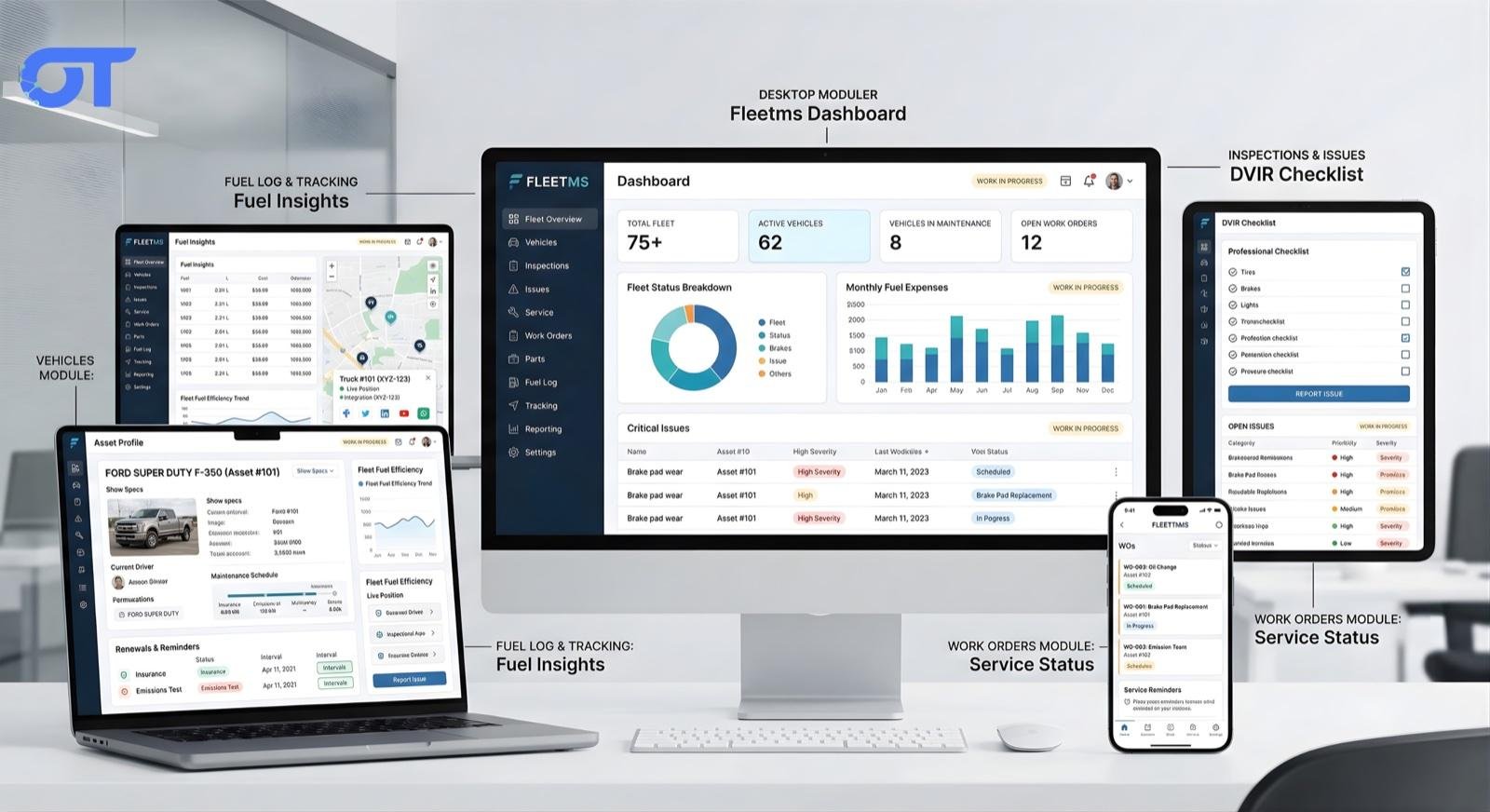
How to Build Fleet Management Software in 2026: Features, Cost & Architecture

Building fleet management software requires a vehicle registry, work order system, maintenance reminders, fuel tracking, driver management, and role-based access. A mid-size SaaS MVP typically costs $60,000–$120,000 and takes 4–6 months with an experienced team.
Commercial Expertise
Need help with Software Development?
Ortem deploys dedicated Custom Software Development squads in 72 hours.
How to Build Fleet Management Software in 2026
Fleet management software is one of the most in-demand categories of business operations SaaS. Every company that runs vehicles — from logistics firms and field service companies to construction businesses and school districts — needs a way to track vehicles, manage maintenance, monitor fuel, and coordinate drivers. Yet most still run on spreadsheets.
If you are evaluating how to build fleet management software — whether as a SaaS product or an internal operations tool — this guide walks you through everything: the features that matter, the right tech stack, the database architecture, real-time tracking design, and a realistic cost breakdown.
Quick answer: A production-ready fleet management SaaS MVP costs $60,000–$120,000 and takes 4–6 months with a dedicated team. Enterprise-grade with GPS integration, AI predictive maintenance, and mobile apps runs $200,000–$400,000+.
What Is Fleet Management Software?
Fleet management software centralises every aspect of operating a vehicle fleet: tracking vehicle locations, scheduling maintenance, managing fuel consumption, creating work orders for repairs, coordinating driver assignments, and generating compliance reports.
The global fleet management market was valued at $25.5 billion in 2023 and is projected to reach $55 billion by 2030, driven by logistics growth, EV fleet adoption, and regulatory pressure on transport operators.
Core Features Every Fleet Management System Needs
1. Vehicle Registry
Every vehicle in the fleet needs a digital record: make, model, year, VIN, licence plate, mileage, fuel type, assigned driver, insurance expiry, and registration documents. This is the foundation — every other module links back to it.
2. Work Order Management
Work orders are the operational heartbeat of fleet maintenance. Each work order should include:
- Auto-numbered ID (WO-1042, WO-1043...)
- Vehicle assignment
- Job type (oil change, brake inspection, tyre rotation, engine repair)
- Parts and labour line items with cost tracking
- Status lifecycle: Open → In Progress → Pending Parts → Closed
- Technician assignment and completion timestamp
- Conversion from driver-reported issues
3. Maintenance Reminders (Interval & Mileage-Based)
This is the feature that delivers the most immediate ROI. Configure reminders per vehicle by:
- Time interval (oil change every 90 days)
- Mileage interval (tyre rotation every 10,000 km)
- Date-based (insurance renewal, registration, MOT/inspection)
The system calculates next-due dates automatically and sends notifications before the deadline — eliminating the manual calendar management that causes compliance failures and costly breakdowns.
4. Fuel Tracking
- Log every fill-up: date, litres/gallons, cost per litre, total cost, odometer reading
- Calculate MPG or L/100km per vehicle automatically
- Surface 30-day and 90-day fuel cost trends
- Flag anomalies: sudden MPG drops (engine issue), excessive fill-ups (fuel theft)
- Clients typically report 8–15% fuel cost reduction within 90 days of deployment
5. Driver Management
- Driver profiles: licence number, licence class, expiry date, contact details
- Vehicle assignment (which driver is assigned which vehicle)
- Driver performance tracking (fuel efficiency, issue report frequency)
- Driver-facing mobile interface for reporting issues and submitting inspections
6. Issue / Defect Reporting
Drivers report issues directly from a mobile interface — tyre pressure warning, unusual noise, dashboard warning light. Each report should:
- Include photo attachment capability
- Auto-populate vehicle and driver details
- Convert to a work order with one click
- Notify the maintenance manager immediately
7. Parts & Inventory
- Parts catalogue with SKU, description, unit cost, and supplier
- Per-location stock levels with low-stock alerts
- Parts usage linked to work orders for accurate cost-per-vehicle tracking
- Vendor management for reorder workflows
8. Digital Inspections (DVIR)
Vehicle inspection forms completed before and after each trip. A drag-and-drop form builder lets managers define custom checklists per vehicle class (truck, van, heavy equipment). Drivers submit completed forms from any device with photo evidence.
9. Reporting & Analytics
- Fleet summary: total vehicles, active vehicles, vehicles in maintenance
- Cost-per-vehicle: fuel + maintenance + parts over any date range
- Downtime report: hours out of service by vehicle or fleet average
- Fuel cost trends with month-over-month comparison
- Export to CSV and PDF for compliance submissions
10. Role-Based Access Control (RBAC)
Five roles cover the typical fleet operation:
| Role | What They Can Do |
|---|---|
| Admin | Full system access, configuration, billing |
| Fleet Manager | View all vehicles, assign drivers, approve work orders |
| Maintenance Manager | Create/update work orders, manage parts inventory |
| Technician | Update assigned work orders, log parts used |
| Driver | Report issues, submit inspections, view assigned vehicle |
Optional / Advanced Features
- GPS Real-Time Tracking — live vehicle location on a map, geofencing alerts, trip history replay
- AI Predictive Maintenance — analyse maintenance history to predict next failure per vehicle
- EV Fleet Management — battery state-of-charge, charging session logging, range anxiety alerts
- Route Optimisation — optimal daily routing for field service vehicles
- Telematics Integration — pull data from OBD-II devices (speed, harsh braking, idling)
- Multi-Tenant SaaS — serve multiple fleet operator organisations from one platform
Tech Stack for Fleet Management Software
Recommended Stack (2026)
| Layer | Technology | Why |
|---|---|---|
| Frontend | React 18 + TypeScript | Component-driven, strong ecosystem, type safety |
| Styling | Tailwind CSS + shadcn/ui | Fast, consistent, professional UI |
| State | TanStack React Query | Server state management with intelligent caching |
| Charts | Recharts or Chart.js | Fleet analytics visualisations |
| Real-time | Supabase Realtime or Socket.io | Live dashboard updates, driver alerts |
| Backend | Node.js + Express or Supabase Edge Functions | Flexible, scalable API layer |
| Database | PostgreSQL | Relational data — vehicles, work orders, parts all have complex relationships |
| Auth | Supabase Auth or Auth0 | Email/password + SSO for enterprise |
| Storage | Supabase Storage or S3 | Inspection photos, documents |
| Maps | Google Maps API or Mapbox | GPS tracking, geofencing |
| Mobile | React Native or Flutter | Driver-facing mobile app |
Database Schema (Core Tables)
vehicles — id, make, model, year, vin, plate, mileage, status, assigned_driver_id
drivers — id, name, licence_number, licence_class, licence_expiry, contact
work_orders — id, vehicle_id, technician_id, type, status, opened_at, closed_at
work_order_items — id, work_order_id, type (parts/labour), description, cost
service_reminders — id, vehicle_id, type, interval_days, interval_miles, next_due_date
fuel_logs — id, vehicle_id, driver_id, date, litres, cost, odometer
issues — id, vehicle_id, driver_id, description, photo_urls, status, work_order_id
parts — id, sku, name, unit_cost, stock_quantity, reorder_level
inspections — id, vehicle_id, driver_id, form_template_id, submitted_at, items (JSONB)
organisations — id, name, feature_flags (JSONB) — for multi-tenant SaaS
Multi-Tenant Architecture
If building a SaaS product (not just an internal tool), multi-tenancy is critical. The cleanest approach for a mid-market fleet SaaS is row-level security (RLS) in PostgreSQL:
- Every table has an organisation_id column
- RLS policies enforce: users only see rows where organisation_id matches their session claim
- Zero data leakage between customers guaranteed at the database layer
- No application-level filter logic needed — the database enforces it
Real-Time Updates: How to Build the Live Dashboard
Fleet managers need to see live data — a vehicle just came in for service, a driver just reported an issue, a work order just moved to In Progress.
Approach 1: Supabase Realtime Supabase wraps PostgreSQL's logical replication into a WebSocket channel. Subscribe to table changes in your React component:
// Subscribe to work_order changes for this organisation
supabase
  .channel('work-orders')
  .on('postgres_changes', {
    event: '*',
    schema: 'public',
    table: 'work_orders',
    filter: 'organisation_id=eq.' + orgId,
  }, (payload) => {
    queryClient.invalidateQueries(['work-orders'])
  })
  .subscribe()
Approach 2: Polling with React Query Simpler and works everywhere — set a refetch interval on critical dashboard queries:
useQuery(['kpi-stats'], fetchKpiStats, { refetchInterval: 30000 })
Use Realtime for high-frequency updates (driver location); polling for dashboards that refresh every 30 seconds.
Development Cost Breakdown
Fleet Management SaaS MVP
Core features: vehicle registry, work orders, maintenance reminders, fuel tracking, driver management, basic reporting, 5-role RBAC, web app only.
| Component | Hours | Cost (at $35–50/hr) |
|---|---|---|
| UX/UI Design | 80–120 hrs | $2,800–$6,000 |
| Frontend (React) | 200–280 hrs | $7,000–$14,000 |
| Backend / API | 160–220 hrs | $5,600–$11,000 |
| Database design + RLS | 40–60 hrs | $1,400–$3,000 |
| Auth + RBAC | 30–40 hrs | $1,050–$2,000 |
| Testing + QA | 60–80 hrs | $2,100–$4,000 |
| DevOps + deployment | 20–30 hrs | $700–$1,500 |
| Total MVP | 590–830 hrs | $20,000–$41,500 |
With a US/UK agency at $100–150/hr, the same MVP runs $59,000–$124,500.
Full-Featured SaaS Platform
Add GPS tracking, mobile apps, AI predictive maintenance, telematics integration, multi-tenant admin:
$150,000–$350,000 depending on GPS provider complexity, mobile platform (iOS + Android), and AI feature depth.
Timeline
- MVP (web only, core features): 12–16 weeks
- Full platform with mobile: 6–9 months
Build vs Buy: Should You Build Custom Fleet Software?
Build custom when:
- You serve a niche fleet type (refrigerated transport, EV fleet, construction equipment) that off-the-shelf tools don't fit
- You want to sell it as a SaaS product
- You need deep integration with existing ERP, dispatch, or telematics systems
- Your operational workflow is genuinely different from standard fleet ops
Buy off-the-shelf (Samsara, Fleetio, Verizon Connect) when:
- You need it deployed in under 30 days
- Your fleet is standard (vans, trucks) with no niche requirements
- Budget is under $20,000 total
Mistakes to Avoid
- Building GPS tracking first — it is the hardest feature and not the highest ROI. Start with maintenance reminders and work orders; add GPS in v2.
- No mobile-first design for drivers — drivers use phones, not desktops. If the issue reporting and inspection flows are desktop-only, drivers won't use them.
- Ignoring multi-tenancy from day one — retrofitting RLS to a single-tenant schema is painful. Design for multi-tenancy even if you only have one customer initially.
- Building your own auth — use Supabase Auth, Auth0, or Clerk. Auth is a solved problem; custom auth creates security debt.
- Skipping reminder automation — manual reminders negate the core value proposition. The automated scheduler is non-negotiable.
Frequently Asked Questions
Q: How long does it take to build fleet management software? A focused team (1 PM, 2 frontend, 1 backend, 1 QA) can deliver a production-ready MVP in 12–16 weeks. Full-featured SaaS with mobile takes 6–9 months.
Q: What database should I use for fleet management software? PostgreSQL. Fleet data is inherently relational — vehicles, drivers, work orders, and parts all have complex foreign-key relationships that relational databases handle cleanly. Add RLS for multi-tenancy.
Q: Do I need GPS tracking in my fleet management software? Not for an MVP. The highest-ROI features are maintenance reminders and work order management — they reduce downtime immediately. GPS adds location visibility but significantly increases complexity and API cost. Add it in v2.
Q: How much does fleet management software cost to build? A core-features MVP with a development team in India costs $20,000–$42,000. The same scope with a US/UK agency runs $60,000–$125,000. Full platform with GPS, mobile apps, and AI: $150,000–$350,000.
Q: What is the best tech stack for fleet management software in 2026? React 18 + TypeScript frontend, PostgreSQL database with row-level security, Supabase for auth/realtime/storage, Node.js or Supabase Edge Functions for the API layer, and React Native for mobile. This stack is production-proven, scalable, and has strong developer availability.
Ortem Technologies built Fleet Sync Pro — a multi-tenant fleet management SaaS with work orders, maintenance reminders, fuel tracking, and 5-role RBAC. If you are planning a fleet management platform, book a free architecture review → | Related: Logistics software development → | Custom software development →
Get the Ortem Tech Digest
Monthly insights on AI, mobile, and software strategy - straight to your inbox. No spam, ever.
About the Author
Technical Lead, Ortem Technologies
Ravi Jadhav is a Technical Lead at Ortem Technologies with 12 years of experience leading development teams and managing complex software projects. He brings a deep understanding of software engineering best practices, agile methodologies, and scalable system architecture. Ravi is passionate about building high-performing engineering teams and delivering technology solutions that drive measurable results for clients across industries.
Stay Ahead
Get engineering insights in your inbox
Practical guides on software development, AI, and cloud. No fluff — published when it's worth your time.
Ready to Start Your Project?
Let Ortem Technologies help you build innovative solutions for your business.
You Might Also Like

How to Build Property Management Software in 2026: Features, AI & Cost Guide

How to Handle Memory in Your AI Coding Setup