
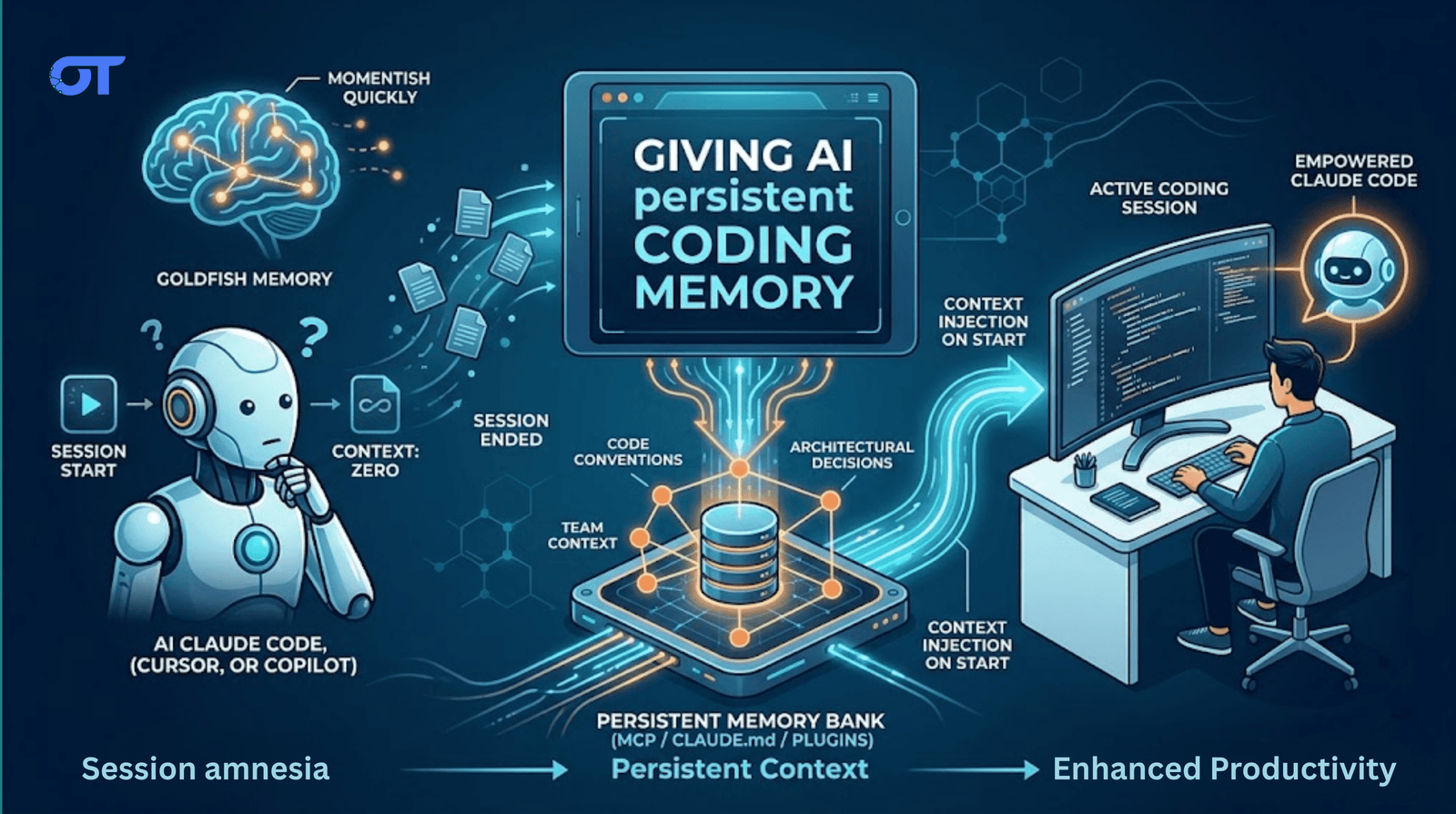
Use CLAUDE.md for project context, add an MCP memory server for structured recall, and enable a plugin like Supermemory for session auto-capture. This hybrid approach keeps your conventions and decisions available across sessions.

Every session with Claude Code, Cursor, or Copilot starts from zero.
That means there is neither any memory of your codebase conventions nor the architectural decision you spent two hours debating last Tuesday.
You re-explain it, it listens. But then you close the session and it’s gone.
There are real, implementable solutions to this. But first:
Tools of the Week
- Supermemory.ai/claude-supermemory
- Installs as a Claude Code plugin.
- Injects your profile at session start.
- Auto-captures decisions when a session ends.
- Has a team memory namespace so one engineer's fix becomes everyone's context next session.
- Memory-bank MCP
- A lightweight MCP server that gives Claude a per-project file store for architectural decisions and conventions.
- Free, local, no third-party and requires one 'npx' command to set up.
- Claude reads/writes to ~/.claude/memory-bank.
- Claude Code memory docs
- Anthropic's official guide to
CLAUDE.md, auto memory, and the full file hierarchy. - The right place to start before reaching for any third-party tool.
Why This Happens
LLMs are stateless.
Every conversation is a new context window with no knowledge of what came before. Claude Code, Cursor, and Copilot all share this limitation.
The model powering your session is not the same continuous entity you talked to yesterday.
It's a fresh instantiation reading only the context you give it at startup. The only memory that survives is what you explicitly provide.
The Three Approaches
Approach 1: CLAUDE.md (native, free, manual)
Claude Code reads a CLAUDE.md file at the start of every session. Whatever is in that file becomes part of Claude's initial context automatically.
~/.claude/CLAUDE.md: global, applies to all projects.<project-root>/CLAUDE.md: project-specific, shared via git.<project-root>/CLAUDE.local.md: personal overrides, gitignored.<project-root>/.claude/rules/*.md: scoped rules by file type or directory.
A practical example for ~/.claude/CLAUDE.md:
- Stack: React + TypeScript + Vite + Tailwind
- Code style: Prettier + ESLint with 2-space indent
- Architecture pattern: feature folders + shared UI library
- Deployment: S3 + CloudFront + GitHub Actions
- Important: Avoid
any, prefer explicit types, no classes
Project-level example:
apiPrefix=/api/v1auth= JWT scopeopenid profile emailcss= Tailwind JIT + custom spacing scaletests= Cypress integration suites
Two rules for
CLAUDE.md: keep it under 200 lines, and put the most important things first.
Claude reads sequentially and weighs the top more heavily. A 500-line file consumes ~3,800 tokens and hurts adherence; a clean 80-line file reduces wrong-scope corrections by 40%.
CLAUDE.md fails when it only carries what you wrote and doesn't capture session learnings automatically unless auto memory is on. It requires discipline. Stale files contradict real codebases.
Approach 2: Memory MCP servers (structured, cross-project, composable)
MCP gives Claude Code external tools. A memory MCP server stores facts, decisions, and patterns in a persistent store and lets Claude query them mid-session.
Three open-source options:
memory-bank(@allpepper/memory-bank-mcp): per-project file-based memory. Good for architecture decisions.mcp-knowledge-graph: entity + relationship store (e.g., "use express-rate-limit" connected to "rate limiting" and "your security policy").mcp-memory-service: local server with vector search and session harvest tool.
Add to your Claude MCP config:
{
  "tools": [
    "mcp-memory-service",
    "memory-bank"
  ]
}
MCP memory works automatically once installed, but Claude chooses when to query. If it doesn't check memory for a task, there is no lookup.
Approach 3: Supermemory Claude Code plugin (automated capture + injection)
Dhravya Shah built a plugin that addresses the MCP limitation.
Two key behaviors:
- Context injection on session start – user profile and recent context preloaded.
- Auto capture on session end – turns are saved without manual
/remember.
Configure triggers at ~/.supermemory-claude/settings.json:
{
  "captureKeywords": ["architecture","refactor","security","performance"],
  "saveOnExit": true
}
For teams, add repo-specific config at <project-root>/.claude/supermemory.json.
repoContainerTag makes shared namespace per repo. One engineer's migration pattern becomes available to everybody.
Where Supermemory fails: requires Pro plan and third-party data handling. Benchmark claims (~99% LongMemEval) are from controlled experiments; real messy sessions will have lower recall.
Approach 4: memory-mcp (self-hosted, tiered, hooks-based)
Two-tier memory architecture using Claude hook system:
- Tier 1: CLAUDE.md (top 150 lines, auto-generated and updated).
- Tier 2:
.memory/state.jsonfull store, queryable mid-session. - Hooks:
Stop,PreCompact,SessionEnd. - Extracts learning from transcripts with Claude (low cost).
Self-hosted, local-only, offline-capable. Typical daily cost: $0.05–$0.10 with Haiku extraction API calls.
The Common Pattern Underneath
All solutions do the same core thing:
- write information that would otherwise vanish at session end
- persist it
- re-inject at startup
Default pattern for most: a clean opinionated CLAUDE.md plus one memory tool (MCP/plugin).
My Take
The problem is not new. Developer complaints about Claude Code's "goldfish memory" date back to 2025.
A proper CLAUDE.md solves 80% if you invest 15–30 minutes weekly.
A responsible setup:
- Tier 1: CLAUDE.md for static rules/architecture
- Tier 2: searchable memory store (MCP or plugin) for learnings
Large context windows help but do not persist across session boundaries. Structured persistent memory does.
Until next time,
Praveen Jha Director - AI Product Strategy, Development, Sales & Business Development
Get the Ortem Tech Digest
Monthly insights on AI, mobile, and software strategy - straight to your inbox. No spam, ever.
Sources & References
- 1.CLAUDE.md Docs - Anthropic
- 2.Supermemory AI - Supermemory
- 3.Memory-Bank MCP - AllPepper
About the Author
Director – AI Product Strategy, Development, Sales & Business Development, Ortem Technologies
Praveen Jha is the Director of AI Product Strategy, Development, Sales & Business Development at Ortem Technologies. With deep expertise in technology consulting and enterprise sales, he helps businesses identify the right digital transformation strategies - from mobile and AI solutions to cloud-native platforms. He writes about technology adoption, business growth, and building software partnerships that deliver real ROI.
Stay Ahead
Get engineering insights in your inbox
Practical guides on software development, AI, and cloud. No fluff — published when it's worth your time.
Ready to Start Your Project?
Let Ortem Technologies help you build innovative solutions for your business.
You Might Also Like
Fleet Management Software Development: Features, Architecture & Build vs Buy Guide (2026)

Top Fintech Software Development Companies in 2026
